
A SMALLER WORKFLOW / APPSCREENSHOOT
App Store Screenshot Size Checker
Check the files you actually plan to upload. This App Store screenshot size checker reads each image, compares exact dimensions with our maintained iPhone and iPad catalog, and reports format and PNG alpha metadata. Choose your screenshots above, or load a fictional example to see the report. A passing file check helps with preparation; it does not assess your app or guarantee store approval.
What the App Store screenshot size checker measures
A familiar aspect ratio does not prove that a screenshot has the right pixel dimensions. A small image can have exactly the same shape as a large accepted image. We report the decoded width and height, then match both portrait and landscape orientations against the catalog. The report also records the file format and original byte size, so you can compare individual assets without opening an image editor.
The catalog covers the iPhone and iPad targets used by this site. It is not a complete validator for every Apple platform. A file without a match is flagged for investigation rather than described as universally invalid. Device targets whose upload availability is not yet confirmed are excluded from matching.
Check a batch before you upload
Choose up to eight PNG, JPEG or WebP files, with a maximum of 20 MB per file and 80 MB for the batch. WebP can be inspected, but it is flagged because it is not a supported App Store screenshot submission format. Processing happens locally in your browser. Large decoded images above 32 megapixels are rejected to keep the task manageable.
Run the check, review every file card, and download the JSON report if you want a record for a release checklist. The cards name matching device presets and explain issues individually. An unreadable file stops the batch with its filename, so you can replace that file and rerun the check.
REAL TOOL OUTPUT / FICTIONAL DEMO
A sample screenshot check report
The example image has 900 × 1800 pixels and a PNG alpha channel. It is readable, but has no exact iPhone or iPad preset match. Load the example above and check it to see the actual file report.
Download example preview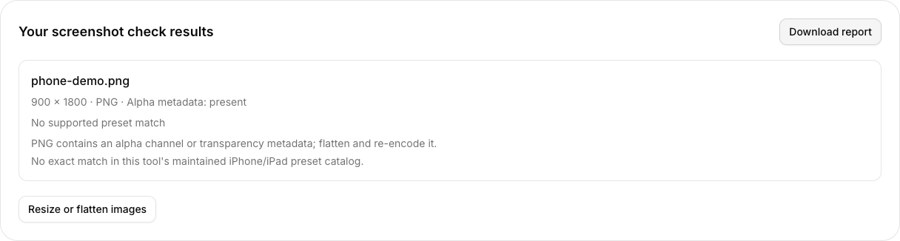
An alpha channel can hide in an opaque-looking PNG
A PNG can look solid while still carrying an alpha channel. The checker reads the PNG color type and looks for transparency metadata, including a tRNS chunk used by some indexed images. It does not infer channel structure from a thumbnail or from whether you can see a checkerboard background. That distinction matters when a store expects an image without alpha.
If alpha metadata is present, use the screenshot resizer to flatten and re-encode the image as JPEG or RGB PNG. Check the downloaded file again. Flattening resolves a file-format concern, but it cannot remove private information, placeholder copy or misleading product claims from the image.
Separate file checks from product review
This tool cannot tell whether a screenshot shows a real feature, whether a headline is truthful, or whether the captured interface matches the device you support. A phone capture resized to an iPad canvas is still a phone interface. File dimensions and the product experience are separate checks, and both deserve attention before submission.
Use the result as one part of your release review. Confirm the required device classes in your own App Store Connect listing, inspect the official specifications, and open the actual exported images at a readable size. Keep a clean copy of your source captures so format fixes do not force you to recreate the design.
Questions about app store screenshot size checker
Does a pass guarantee App Store approval?
No. A pass covers this tool’s dimension, format and alpha-metadata checks. Apple also reviews screenshot content and the app itself. Confirm the requirements for your actual listing before upload.
Can I check landscape screenshots?
Yes. Width and height are matched in both orientations. A landscape match identifies a supported preset; it does not verify that your app supports landscape or that the captured interface is correct.
Why is my solid PNG flagged?
An opaque-looking image can still contain an alpha channel or transparency metadata. The checker examines the PNG structure. Re-encode through the resizer as JPEG or RGB PNG, then check the new file.
Are WebP files accepted?
The checker can read WebP images and report their dimensions, but flags the format for conversion. Use PNG or JPEG for App Store screenshot submission; changing only the filename extension does not convert the file.
Does this cover every Apple device?
No. Matching uses this site’s maintained iPhone and iPad catalog. Other platforms and newly added device sizes may require separate verification. The report says when no catalog match is found.
Can I save the check results?
Yes. Download the JSON report after checking your batch. It includes each filename, decoded dimensions, format, byte size, matching presets and issues. The report does not contain the image pixels.
Reference: Apple screenshot specifications. Tool catalog checked October 3, 2026. Review current store requirements before submission.