
A SMALLER WORKFLOW / APPSCREENSHOOT
Google Play Feature Graphic Generator
Build a Google Play feature graphic from one image and a short headline. The canvas is fixed at 1024 × 500 pixels, and the result is a downloadable image rather than a link to a separate editor. Use your app artwork, choose a theme and review the composition. The example uses fictional product imagery so you can try the complete workflow before adding your own assets.
Create and export your graphic
Upload one PNG, JPEG or WebP image up to 20 MB, or load the example. Type a headline of up to 100 characters, choose Ocean, Orchard or Sunset, and generate the artwork. Headline text wraps within its area; longer copy is reduced to fit, so a shorter message is usually easier to read. Download the individual image or the ZIP containing it.
Changing the input or settings clears the previous result, which prevents an old export being mistaken for your current design. The source image stays in your browser during this task. No app-store account is needed for the tool, and the download is not automatically submitted to Play Console.
FRAMELESS SAMPLE / FICTIONAL DEMO
See the example result
This frameless sample was generated by this page’s tool using fictional demo content. Load the example above to preview your chosen 2D or 3D device frames, change the settings and generate your own downloadable version.
Download example preview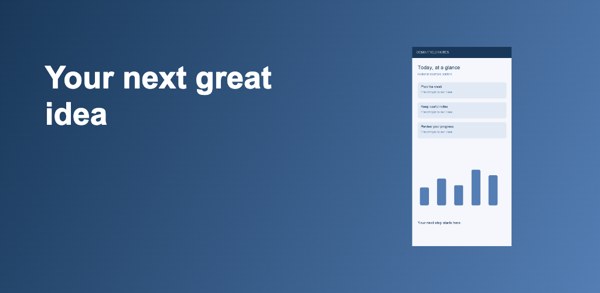
Google Play feature graphic generator output details
The output is exactly 1024 × 500 pixels. Choose JPEG or 24-bit RGB PNG without an alpha channel. Our PNG export writes RGB pixels rather than relying on a browser’s default RGBA PNG encoding. This means an opaque-looking preview and the downloaded file’s channel structure are treated as separate concerns.
Choose no frame, a 2D device with its available colors, or a 3D device with adjustable angles. The device artwork and models come from the same catalog as our screenshot studio. Google’s feature graphic guidance recommends conveying the app experience without overloading the image or placing key content in cutoff zones. The spacing used here is a design choice, not an official safe-area guarantee. Check the current Google reference and inspect your own visual at a small display size.
Review branding, crop risk and unsupported tasks
Keep essential details inside the main composition and leave the outer edges for background. Feature graphics can appear in different contexts, sometimes with overlays. This page does not simulate every Play Store surface, and a successful export cannot guarantee that all placement rules or content policies are satisfied. Review the official examples when preparing a release.
This focused generator has one image, a headline, optional supporting text, three background themes and selectable 2D or 3D device artwork. It does not fetch an app listing, translate your text or invent marketing claims. For independently positioned text layers, complex image arrangements or a wider brand system, continue in the full studio. Keep the banner’s colors and message consistent with your screenshot set without duplicating every detail.
Make the message work in a wide composition
A feature graphic is a separate listing asset, not a portrait screenshot squeezed into a banner. The default split composition reserves the left portion for your headline and fits your selected device into the right portion. You can also choose a headline-above layout or a full-canvas composition. It keeps the source image’s proportions instead of stretching it. The background fills the canvas, creating a coherent composition even when your source is tall or square.
Write one specific reason to explore the app. A long description competes with the visual and becomes difficult to read when the banner is reduced. Review the actual generated image, not just the headline field, and remove any text or artwork that implies a feature your released app does not provide.
Questions about google play feature graphic generator
What size does this generator export?
Every output is 1024 × 500 pixels, including the files inside the ZIP. There is no export-scale multiplier in this tool. Download and inspect the actual image before placing it in Play Console.
Does the PNG have an alpha channel?
No. PNG results are encoded as 24-bit RGB files without an alpha channel. JPEG is also available. This differs from simply filling a transparent canvas and exporting its default RGBA PNG.
Can I upload a logo or screenshot?
Yes. Use a PNG, JPEG or WebP image up to 20 MB. The image is fitted into the right side of the layout. Choose source artwork that makes sense at the banner’s smaller display sizes.
Can I change the headline?
Yes. Edit the headline before generating. Text wraps within its allotted area. Longer copy is reduced to fit, so inspect readability and shorten the message if the resulting text becomes too small.
Will it upload to Google Play?
No. Download your result and upload it yourself in Play Console. The tool creates files only. It does not connect to your developer account or verify the rest of your listing.
Does the layout guarantee approval?
No. Dimensions and file encoding are only part of the requirements. Review the content, current Google guidance and placement examples. Avoid unsupported claims and artwork that misrepresents your app.
Reference: Google Play preview asset guidance. Tool catalog checked October 3, 2026. Review current store requirements before submission.